QR Code Check-In for Events: What Changes Compared with Paper Guest Lists
This article was automatically translated from the Japanese original. Read the original in Japanese
QR code check-in for events is a method in which a unique QR code is issued to each invited guest, and their arrival is recorded by scanning it on the day. It replaces the work of searching for a name on a paper or spreadsheet list and ticking it off with a single scan.
Here is the conclusion up front. What QR code check-in really changes is less the speed of check-in itself than the fact that the same guest list can be viewed in multiple places, at the same time, in its latest state. Speed follows as a result. In this article, we look at it from a practical standpoint: what changes compared with paper-based operations, what you need to prepare to switch, and the situations where paper is still necessary even with QR codes.
Please note that this article is a generalization drawn from our own event operations experience, and does not refer to any specific brand, project, or individual.
What Makes Paper Guest Lists Difficult to Run?
When you handle check-in with a paper or spreadsheet list, the following four things happen at once.
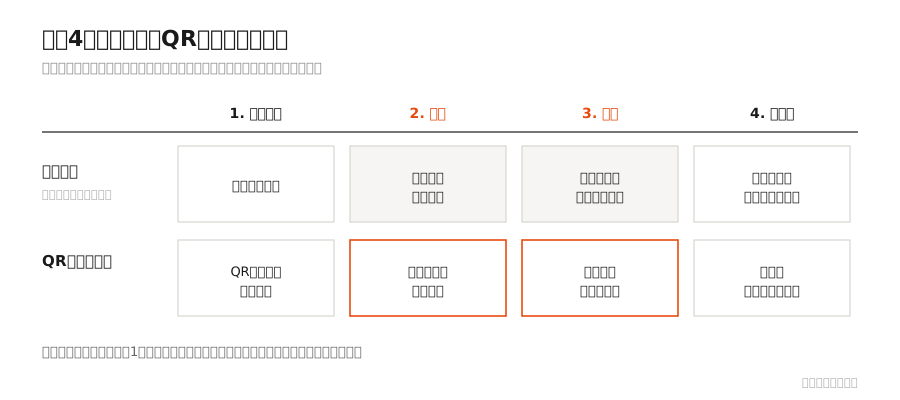
First, verification becomes a task of "searching." Because you have to scan the list by eye to find a name, the longer the list, the more time it takes. It takes even longer when names are hard to read, when several guests share the same surname, or when the spelling on the invitation differs from the one on the day.
Second, the list is out of date the moment it is printed. Last-minute cancellations, changes to a substitute attendee, and additional invitations are not reflected on a list that has already been printed. As replacements pile up, multiple versions end up circulating on site.
Third, it becomes hard to add more check-in lanes. To set up two reception points, you either split the list or hold two copies of the same one. If you split it, some guests will not appear on the list in front of you; if you hold two copies, it becomes unclear which one has been marked.
Fourth, attendance records are left for a later step. The marks made on the day have to be written up cleanly after the event. That write-up tends to happen after memories have faded.
What Changes with QR Code Check-In?
| Paper / spreadsheet list | QR code check-in | |
|---|---|---|
| Verification | Search for the name by eye | Confirmed with a scan |
| Simultaneous check-in | Split the list, or consolidate at one point | The same list can be viewed on multiple devices at once |
| Last-minute changes | Replacement needed after printing | Changes can be reflected right up to the day |
| Attendance records | Marks from the day are compiled afterward | Recorded on the spot |
| Second check-in with the same invitation | Can only be noticed by eye | Automatically rejected |
| What the venue needs | Nothing in particular | Devices and a network connection |
We want to be honest about the last row. QR code check-in requires devices and connectivity. This is the reason for the situations, described later, where paper is still necessary.
How Do You Deliver the QR Code to Guests?
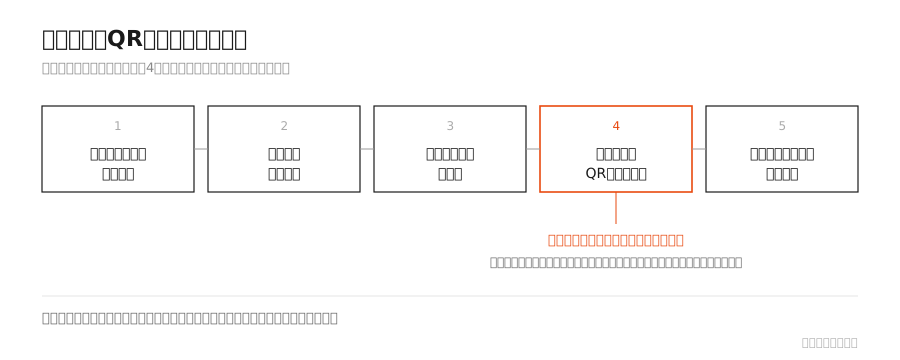
The process runs as follows.
- Prepare the guest list. You need each guest's name and contact information (such as an email address)
- Send the invitations. State clearly at this point what guests should bring on the day
- Collect RSVPs. If responses do not come in here, you cannot move on to the next step
- Issue QR codes in response to attendance replies. Make sure each code is delivered directly to the person who replied
- Scan and record at check-in on the day. After the event, attendance and arrival times remain as data
The key point is step 4, "delivered directly to the person." If the organizer receives all the codes and forwards them, a separate task arises of tracking who was sent which code, and mistakes become more likely. What a QR code contains, and what happens on the server side when it is scanned, is explained step by step in S/PASS GUIDE's How QR Code Check-In Works.
Situations Where Paper Is Still Needed Even with QR Codes
This is the first thing to check when deciding to switch.
- Venues with weak connectivity. In basements or venues with poor signal, always check on site beforehand
- Device power. Check-in starts before the doors open. Bring backup power
- Guests who cannot present a QR code. It happens: the email did not arrive, or the guest does not have a device with them on the day. Always keep a way to check in by name. Never make it a reception where guests cannot enter without a QR code
- Same-day additions and substitute attendees. Have a way to register them on the spot
We see the third point as a matter of attitude as much as of operations. Since guests have taken the trouble to come, making them wait because they do not fit a system we set up for our own convenience should never happen. How to handle problems on the day, such as a guest being unable to show a QR code or the connection going down, is covered in S/PASS GUIDE's Day-of Check-In Flow for Invitation-Only Events.
Why We Built Our Own
Everything written above was a problem we faced ourselves. We work directly on event production, and every time we have taken on the check-in queues, the last-minute changes, and the clean-up after the event ourselves. Out of that need, we developed S/PASS, a QR check-in system built specifically for invitation-only events.
- Guests do not need to install an app or register as a member
- Check-in is completed in 2 seconds
- Check-in can be handled on multiple devices at the same time
- A second scan of the same QR code is automatically rejected, so attendance records do not drift from reality
That said, changing the system does not by itself lower the peak of arrivals. You still need to design how many staff will handle check-in and how guests will flow through the space. We cover that in our Check-In Design Guide for Invitation-Only Events.
Closing
Moving to QR codes is not about making check-in mechanical. It is about reducing the parts that people do not need to do: "searching" and "writing up cleanly afterward."
Where to spend the time that frees up depends on the design of each event. We want to spend it on greeting and guiding our guests.
Frequently Asked Questions
Q. What do we need to introduce QR code check-in at an event?
A. Three things: guests' names and contact details, a system to issue and send QR codes, and devices and a network connection to scan them on the day. No special equipment is needed, as codes can be read with a smartphone or tablet camera.
Q. Do we need to ask guests to install an app?
A. It depends on the method. For invitation-only events, we recommend a format that does not require app installation or member registration, because it would mean asking guests who are visiting for the first time to complete a task at the entrance.
Q. Can guests who forget their QR code not enter?
A. Please do not set up check-in that way. Always keep a way to check in by name so that arrivals can be recorded on the spot.
Q. How is this different from managing check-in with a spreadsheet?
A. A spreadsheet can also be viewed by several people at once, but the task of "searching" remains at the check-in desk, and mix-ups over who marked which row can occur. QR codes combine verification and recording into a single step. How to build check-in with Google Forms and a spreadsheet, and its limits, are summarized in S/PASS GUIDE's How to Run Check-In with Google Forms + Spreadsheets, and Its Limits.
Q. What should we do if we are worried about the venue's connectivity?
A. Check the signal on site beforehand. In addition, always prepare a printed guest list and a procedure for checking in by name as a backup.
Note: This article is a generalization drawn from our own event operations experience. Descriptions of S/PASS features are based on its specifications. It is written so that no individual project, brand, or person can be identified.